In today’s digital landscape, efficient and secure data storage is paramount for companies of all sizes. Cloud storage solutions offer a compelling alternative to traditional on-premise storage, providing scalability, accessibility, and cost-effectiveness. This exploration delves into the various types of cloud storage, security considerations, integration strategies, and cost optimization techniques, empowering businesses to make informed decisions about their data management.
We’ll examine the key differences between public, private, hybrid, and multi-cloud models, highlighting their respective strengths and weaknesses. Furthermore, we’ll discuss crucial security protocols, compliance requirements, and best practices for safeguarding sensitive data. The journey will also encompass practical guidance on integrating cloud storage with existing systems, optimizing costs, and leveraging cloud services to enhance overall functionality and performance.
Security and Compliance in Cloud Storage
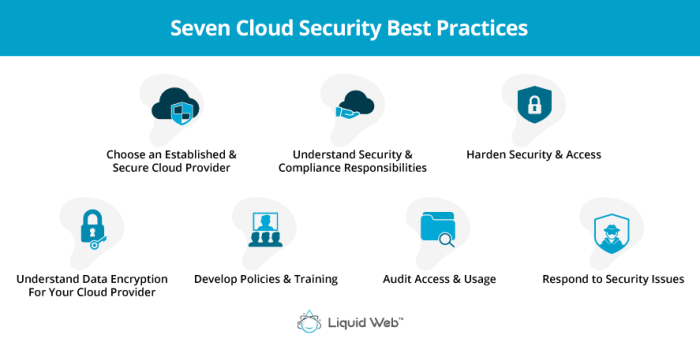
Protecting sensitive company data in the cloud requires a multi-layered approach encompassing robust security measures and strict adherence to relevant compliance regulations. This is crucial not only for maintaining business continuity but also for safeguarding reputation and avoiding hefty legal penalties. A well-defined security strategy ensures data integrity, confidentiality, and availability, while compliance frameworks provide a structured approach to managing risks associated with regulated data.
Data Encryption, Access Control, and Threat Detection
Effective data protection begins with robust encryption. Data at rest (data stored on servers) and data in transit (data moving between systems) should be encrypted using strong, industry-standard algorithms. This prevents unauthorized access even if a breach occurs. Access control mechanisms, such as role-based access control (RBAC), limit user access to only the data necessary for their roles.
Multi-factor authentication (MFA) adds an extra layer of security, requiring multiple forms of verification before granting access. Regular security audits and penetration testing identify vulnerabilities before malicious actors can exploit them. Advanced threat detection systems, including intrusion detection and prevention systems (IDS/IPS), monitor network traffic and system activity for suspicious behavior, providing early warning of potential threats.
These systems often leverage machine learning to identify and respond to evolving threats more effectively.
Compliance Requirements for Regulated Data
Storing regulated data in the cloud necessitates adherence to specific compliance standards. The Health Insurance Portability and Accountability Act (HIPAA) governs the protection of health information in the United States. Compliance requires implementing strict access controls, encryption, and audit trails. The General Data Protection Regulation (GDPR) in Europe focuses on the protection of personal data. Companies must obtain consent for data processing, provide data transparency, and ensure data security throughout the data lifecycle.
The Payment Card Industry Data Security Standard (PCI DSS) mandates stringent security measures for organizations handling credit card information. These regulations require detailed security assessments, vulnerability management, and regular security audits. Meeting these compliance requirements often involves implementing specific security controls, maintaining detailed documentation, and undergoing regular audits to demonstrate compliance. Failure to comply can result in significant fines and reputational damage.
Examples of Successful Cloud Security Strategies
The financial services industry often employs sophisticated encryption techniques, including encryption at rest and in transit, coupled with rigorous access control measures and regular security audits. Healthcare providers leverage cloud-based solutions with HIPAA-compliant features, such as data encryption and access controls tailored to HIPAA requirements. Retailers using cloud-based payment processing systems implement robust PCI DSS compliance measures, including strong encryption and regular vulnerability scans.
These examples highlight the importance of tailoring cloud security strategies to specific industry needs and regulatory requirements. Successful strategies involve a combination of technological safeguards, strong security policies, employee training, and ongoing monitoring and assessment.
Choosing the Right Cloud Storage Solution for a Company

Selecting the optimal cloud storage solution is crucial for any company, impacting operational efficiency, data security, and overall cost-effectiveness. A well-informed decision requires careful consideration of various factors, ensuring the chosen solution aligns perfectly with the company’s specific needs and long-term goals. Ignoring these factors can lead to suboptimal performance, security vulnerabilities, and unnecessary expenditure.
Key Factors in Cloud Storage Solution Selection
Companies must assess several critical factors before committing to a cloud storage provider. These factors are interconnected and should be evaluated holistically. Failure to consider all aspects can result in a solution that doesn’t meet the organization’s needs.
- Data Volume and Growth Projections: The amount of data currently stored and the anticipated future growth are fundamental. A solution must comfortably accommodate current needs and scale efficiently to handle future increases without performance degradation or significant cost increases. For example, a rapidly growing startup will need a solution with highly scalable storage capacity, whereas a small business with a stable data volume may find a simpler, less expensive solution suitable.
- Budgetary Constraints: Cloud storage pricing models vary widely. Companies must establish a clear budget and evaluate pricing structures, including storage costs, data transfer fees, and any additional features. Understanding the total cost of ownership (TCO) is crucial, considering factors like potential future growth and the cost of managing the solution.
- Security and Compliance Requirements: Data security and compliance with relevant regulations (e.g., HIPAA, GDPR) are paramount. The chosen provider should offer robust security features, including encryption, access controls, and regular security audits. Compliance certifications should be verified to ensure adherence to industry standards and legal requirements. For instance, a healthcare company must prioritize HIPAA-compliant solutions.
- Scalability and Performance: The ability to scale storage capacity and performance easily is essential for accommodating future growth and fluctuating demands. Consider factors such as data access speed, latency, and the provider’s infrastructure reliability. A solution should be able to handle peak demands without compromising performance or accessibility.
- Integration with Existing Systems: Seamless integration with existing IT infrastructure and applications is critical. The chosen solution should integrate smoothly with current systems to avoid compatibility issues and streamline workflows. Consider factors such as API access, support for various file formats, and compatibility with existing software.
Decision-Making Flowchart for Cloud Storage Selection
A structured approach simplifies the selection process. The following flowchart Artikels a logical sequence for evaluating potential cloud storage providers.
This flowchart would be visually represented here. It would begin with a decision point: “Define data volume, budget, security needs, and scalability requirements.” This would branch to a series of decision points, each evaluating a specific factor. For example, one branch might ask: “Does the provider meet security and compliance requirements?” Yes would lead to another decision point, while No would lead back to re-evaluating providers.
The final decision point would be the selection of a provider based on the criteria met. The flowchart would utilize simple yes/no decisions and arrows to guide the decision-making process.
Evaluating Performance and Reliability of Cloud Storage Solutions
Thorough evaluation of performance and reliability is crucial. This involves several key considerations.
- Performance Benchmarks: Conduct performance tests to measure data transfer speeds, latency, and overall responsiveness. Compare results across different providers to identify solutions that meet performance expectations. Real-world testing, simulating typical usage scenarios, provides the most valuable insights.
- Service Level Agreements (SLAs): Review the provider’s SLAs carefully, paying close attention to uptime guarantees, data availability, and recovery time objectives (RTOs). Strong SLAs demonstrate the provider’s commitment to reliability and performance.
- Vendor Reputation and Reviews: Research the provider’s reputation, considering customer reviews and industry reports. A strong reputation suggests a history of reliable service and responsiveness to customer needs. Look for independent reviews and ratings from reputable sources.
- Disaster Recovery and Business Continuity Plans: Assess the provider’s disaster recovery and business continuity plans to ensure data protection in case of outages or other unforeseen events. The plans should Artikel procedures for data backup, recovery, and ensuring business continuity. Verify the plans are comprehensive and regularly tested.
Integration with Existing Systems

Seamless integration of cloud storage solutions with a company’s existing IT infrastructure is crucial for maximizing efficiency and minimizing disruption. This involves connecting cloud storage services with on-premise systems, other cloud services, and various applications, creating a unified data environment. Successful integration streamlines workflows, improves data accessibility, and enhances overall productivity.Effective integration requires careful planning and consideration of the company’s specific IT landscape, including the types of applications used, existing data structures, and security protocols.
A well-defined integration strategy minimizes complications and ensures a smooth transition.
Methods for Integrating Cloud Storage with Existing Systems
Several approaches facilitate integration. API-based integrations leverage application programming interfaces to enable direct communication between cloud storage and other systems. This allows for automated data transfer and synchronization. For example, a CRM system can automatically upload customer data to cloud storage for backup and archiving. Alternatively, file synchronization and sharing tools offer a simpler approach, providing a user-friendly interface for transferring files between cloud storage and local devices or other cloud services.
This method is suitable for less complex integration needs. Finally, specialized integration platforms offer pre-built connectors and tools that simplify the process of connecting different systems. These platforms often provide features for data transformation and workflow automation.
Examples of Successful Cloud Storage Integrations
A manufacturing company successfully integrated its cloud storage solution with its ERP system, automating the backup and retrieval of production data. This eliminated manual processes, reducing errors and saving time. A marketing agency integrated its cloud storage with its project management software, allowing team members to easily access and share files, improving collaboration and project efficiency. These examples highlight the benefits of well-planned integrations.
Challenges in Cloud Storage Integration
Implementing cloud storage integrations can present challenges. Data migration can be complex and time-consuming, particularly for large datasets. Maintaining data consistency across different systems requires careful planning and robust data synchronization mechanisms. Security concerns, such as ensuring data encryption and access control, are paramount. Furthermore, compatibility issues between different systems and software versions can hinder seamless integration.
Addressing these challenges proactively is crucial for a successful implementation.
Step-by-Step Guide to Integrating Cloud Storage with Applications
Successful integration involves a phased approach. First, assess existing systems and applications to identify integration needs and opportunities. Second, choose the appropriate integration method (API, file synchronization, or integration platform) based on complexity and requirements. Third, configure the chosen method, ensuring proper authentication and authorization. Fourth, test the integration thoroughly to identify and resolve any issues.
Finally, monitor the integration continuously to ensure its ongoing performance and stability. This structured approach ensures a smooth and efficient integration process.
Cost Optimization Strategies
Managing cloud storage costs effectively is crucial for maintaining a healthy budget and maximizing the return on investment for your cloud infrastructure. Uncontrolled spending can quickly escalate, so implementing proactive cost optimization strategies is essential. This section will Artikel key strategies and tools to help you achieve significant savings.Effective cost management hinges on understanding your data, its usage patterns, and the various storage options available.
By aligning your storage choices with your data’s lifecycle and access frequency, you can significantly reduce expenses. This involves a combination of strategic planning, data governance, and leveraging the tools provided by your cloud provider.
Data Lifecycle Management
Data lifecycle management (DLM) involves strategically managing data throughout its entire lifespan, from creation to archiving and eventual deletion. This approach recognizes that not all data holds the same value or requires the same level of accessibility. By classifying data based on its importance and frequency of access, you can apply appropriate storage tiers and policies. For example, frequently accessed active data can reside in faster, more expensive storage, while infrequently accessed archival data can be moved to cheaper, slower storage options like cloud archives or cold storage.
This tiered approach minimizes expenditure by only paying for the performance needed for each data set. Implementing DLM involves establishing clear data retention policies, automated data migration processes, and regular audits to ensure compliance and cost-effectiveness. A well-defined DLM strategy can lead to substantial savings by reducing the amount of data stored in premium storage tiers.
Storage Tiering
Cloud providers typically offer a range of storage tiers with varying price points and performance characteristics. These tiers are designed to accommodate different data access patterns. For instance, Amazon S3 offers several tiers, including S3 Standard (high performance, frequent access), S3 Intelligent-Tiering (automatically adjusts storage based on access patterns), S3 Standard-IA (infrequent access), S3 One Zone-IA (infrequent access with reduced redundancy), and S3 Glacier (archive storage).
By strategically placing your data within the appropriate tier based on access frequency, you can optimize costs. For example, rarely accessed log files could be moved to a lower-cost, slower tier, while actively used application data remains in a higher-performance tier. Careful analysis of your access patterns is key to successful storage tiering. Regularly reviewing and adjusting your tiering strategy is also important to adapt to changing usage patterns.
Cloud Storage Cost Calculators and Monitoring Tools
Cloud providers offer various cost calculators and monitoring tools to provide transparency into your spending. These tools allow you to estimate costs before committing to a specific configuration and to track your actual spending over time. These tools can provide granular insights into storage usage, data transfer costs, and other relevant expenses. Utilizing these tools proactively allows for early identification of potential cost overruns, enabling timely adjustments to your strategy.
Regular monitoring of these metrics is crucial for identifying trends and optimizing your storage strategy continuously. For example, AWS Cost Explorer and Azure Cost Management + Billing provide comprehensive views of cloud spending, allowing you to identify areas for optimization. Regular review of these dashboards can reveal unexpected cost spikes or areas where optimization is possible. These tools are invaluable for maintaining control over cloud storage expenses.
Cloud Services and Their Impact on Cloud Storage
Cloud storage doesn’t exist in a vacuum. Its effectiveness and capabilities are significantly amplified by the integration with other cloud services. These services, ranging from compute power to networking infrastructure and database management, work synergistically to create a robust and scalable storage solution tailored to modern business needs. This interconnectedness allows for enhanced functionality, improved performance, and ultimately, a more efficient and secure data management strategy.The interaction between cloud storage and other cloud services unlocks significant advantages.
For instance, robust compute capabilities allow for faster data processing and analysis directly from the cloud storage repository. High-speed networking ensures quick data transfer and access, regardless of location. Meanwhile, integrated database services streamline the organization and querying of data stored in the cloud. These combined elements translate to streamlined workflows, improved data accessibility, and ultimately, a competitive edge for businesses.
Data Backup, Disaster Recovery, and Business Continuity Enhancements
Leveraging cloud services significantly improves data backup, disaster recovery, and business continuity strategies. Cloud-based backup solutions, often integrated with compute and networking services, provide automated and frequent backups to geographically dispersed data centers. This redundancy minimizes the risk of data loss due to hardware failure or natural disasters. In the event of a disaster, the seamless integration with compute resources enables rapid recovery and restoration of data from backup locations, ensuring minimal downtime.
Moreover, features like replication and failover mechanisms, facilitated by networking and compute services, guarantee business continuity even during unforeseen outages. For example, a company using Amazon S3 for storage could integrate it with AWS EC2 (compute) and AWS Global Accelerator (networking) to ensure fast and reliable data backups and disaster recovery capabilities across multiple availability zones. This setup allows for near-instantaneous failover to a secondary region in case of a primary region outage.
Comparison of Cloud Service Models for Managing Cloud Storage
Understanding the different cloud service models – Infrastructure as a Service (IaaS), Platform as a Service (PaaS), and Software as a Service (SaaS) – is crucial for selecting the optimal cloud storage solution. Each model offers a distinct level of control and responsibility, impacting both cost and management complexity.
The choice of model significantly influences the management of cloud storage. Let’s examine the advantages and disadvantages of each:
- IaaS (Infrastructure as a Service):
- Advantages: Maximum control and flexibility; cost-effective for large-scale deployments; ideal for highly customized solutions.
- Disadvantages: Requires significant technical expertise for management and maintenance; higher initial setup costs; ongoing management responsibilities.
- PaaS (Platform as a Service):
- Advantages: Reduced management overhead; faster deployment; focus on application development rather than infrastructure management; often includes built-in storage solutions.
- Disadvantages: Less control over infrastructure; vendor lock-in potential; may not be suitable for highly customized storage requirements.
- SaaS (Software as a Service):
- Advantages: Minimal management overhead; easy to use; typically includes storage as part of the service; cost-predictable.
- Disadvantages: Limited customization options; vendor lock-in; potential security concerns related to data residing on a third-party platform; dependence on vendor for updates and maintenance.
Ultimately, selecting the right cloud storage solution hinges on a careful evaluation of a company’s specific needs, including data volume, budget, security requirements, and scalability expectations. By understanding the nuances of different cloud storage models, implementing robust security measures, and employing effective cost optimization strategies, businesses can harness the power of the cloud to streamline operations, enhance data protection, and drive growth.
This comprehensive overview serves as a valuable resource for navigating the complexities of cloud storage and making informed choices to best support a company’s long-term data management strategy.
Quick FAQs
What is the difference between IaaS, PaaS, and SaaS in cloud storage?
IaaS (Infrastructure as a Service) provides basic storage infrastructure; PaaS (Platform as a Service) offers storage as part of a development platform; SaaS (Software as a Service) integrates storage within an application.
How can I ensure data recovery in case of a cloud provider failure?
Implement a robust backup and disaster recovery plan, potentially utilizing multiple cloud providers or geographically diverse storage locations for redundancy.
What are the legal and regulatory considerations for storing sensitive data in the cloud?
Compliance with regulations like GDPR, HIPAA, and PCI DSS depends on the type of data and industry. Ensure your chosen provider and your own security practices meet these requirements.
How do I choose between public, private, and hybrid cloud storage?
Public cloud offers cost-effectiveness and scalability; private cloud prioritizes security and control; hybrid combines the benefits of both, offering flexibility.